
Introduction
- Do you have an introductory video I can watch?
Yes, here is a video that covers most of what is covered in this FAQ section: ' 👉 How to use BSVSearch.com to live, work and earn true Bitcoins anywhere, anytime
- What is BSV Search?
BSV Search is a website for people to find others with whom to transact in BSVs, the tokens managed by the original Bitcoin Protocol restored and implemented on Bitcoin Satoshi Vision (BSV).
- Businesses can create a page for their business. From restaurants and hotels to creative people in film and music as well as traditional services like accounting and law advice.
- People and businesses can also offer real estate properties for sale or rent.
- BSV Search is a place where you can sell all types of new or used vehicles from cars, vans or trucks to boats, yachts and canoes, inluding light vehicles like bikes and scooters.
- It is a place where you can sell new or used household items like furniture, clothing, appliances and gardening tools.
- Artists, Sculptors, photographers and other creative people can also promote their works under the Creations section, and link the BSV search page to their website.
- Writers and authors can promote their books and ebooks in the Publications section, and link the BSV search page to a website where people can purchase their works.
- Freelancers can offer their services and those looking for the freelance services can advertise their need.
You create a page providing the information of your offer, provide your details so people can contact you. If you are selling your publications or creative works, you link your BSV page to a page on your website, or blog, where people can purchase the specific product you are promoting. You organise and manage your transactions directly with the buyer, the seller, or service provider. You are in full control.
BSVSearch.com also contributes in educating people about the true Bitcoin (BSV, not BTC), exploring all its features and benefits as well as the different tools, products, software and apps in its eco-system.
BSV Search empowers you to use the power of the Bitcoin Satoshi Vision — the coin, the network and the protocol — to live, work and earn a living in an ever-modernising world.
More recently, BSV Search has added two ways to bring your work directly onto the blockchain. The Ordinals directory lets you register on-chain creations — images, music, video, text and more — so others can view, tip, buy or license them. Web3 Sites go a step further: complete websites whose pages are inscribed on-chain and browsed right here under a short address such as bsvsearch.com/earthlog.web3. Both have their own sections further down this page.
- How much does it cost to post here?
None. It is free to post here. So go ahead and post as much as you want. Registering an Ordinal is free on BSV Search too — the only cost is the small blockchain fee to inscribe your content on-chain in the first place, which goes to the network, not to us.
- How do I submit my own content?
You need to Create An Account.
After creating an account, you can make a submission to add your business, sell an item or offer it for rent by clicking here. To add an on-chain creation to the Ordinals directory, use "Register an Ordinal" in the Ordinals section; Web3 Sites are curated by BSV Search for now, with self-service publishing coming later.- Do you need to approve submissions first? How does the approval process work?
Before submissions are cleared for publication, we quickly run through the submission for apparent things like offensive or pornographic text and images and other indications that a submission is from a bot or a spammer. This means so long as you are making an honest effort to submit legitimate material, you can expect your submissions to be cleared for publication.
- How do I find out about all the post from a particular user?
When you are viewing the profile of a user, click on Submissions to look at all the submissions they currently have.

When you click that, you will see a list of the Submissions from the user.

- How do I find out the most recent activities of a particular user?
When viewing a user profile, you see a link to their activities:

By clicking here, you get to see their recent activities to see if they have made updates to one of their posts that you might have interest in or to see what comments they have been making on the website. Online, these little details can help us know people a little bit more and helps us decide whether they are the type of people we want to deal with. We want BSV Search to be a website that gives people positive experiences, and we want to encourage participants to be civil, friendly and helpful and help them do more business.
- How do I find out when a submission has been posted and when it was last modified or updated?
At the bottom of each submission is a Post Details section. This is where extra information about a post can be seen like Last Modified date and the Post Date.

The Different Sections
- BSV-Friendly Businesses/Organisations
This section is where you can search for a restaurant, an accountant, a plumber or any other business in your local area who are happy to accept BSV in search of their products or services. You can also search for organisations that are non-business entities, such as communities, websites, and forums that support BSV.
We are continually filling up our directory to ensure that people all over the world can find what they are looking for. If you have a business and you want to take advantage of the BSV payment system and attract business from BSV fans and supporters, we invite you to list your business here, without waiting for us to add it for you, because we are a small team and we are likely going to miss many business and organisations.We encourage ALL businesses: from restaurants, hotels, hamburger places and pizzerias to services like those who provide trades services like electricians and builders. Professional services like development in blockchain, the web and the internet are encouraged, including traditional services like accountancy, law, bookkeeping, notary services, etc.
Organisations that are necessarily set up as a business (for-profit) entity. Community initiatives and other non-profits can and should list their organisations here.- My Business/Organisation is listed here and we want to modify our details, how can we do this?
To confirm who submitted the listing, you can check its Contact tab and if it indicates BSVSearch, please reach out to us, so we can assign ownership and responsibility of that page to you. You will need to create an account first, and we will need to verify that the email address of the account is an email address in the domain name of the entity.
Requests to have listings deleted for an organisation needs to be made from an email in the same domain name as the entity to ensure that the person requesting its deletion is representing the company.- Vehicles
This section is where you can post an offer to sell any of the following vehicles:
- Cars, vans, trucks and motorcycles
- Bikes, eBikes, scooters and hoverboards
- Boats, yachts, canoes and kayaks
- Campervans and motorhomes
- Hang Gliders, balloons, jetpacks and snowmobiles
- Other vehicles
- Properties for Sale or Rent
In this section, you can offer any of your properties for sale or rent - whether it is Residential, Commercial, Industrial or Land.
All property types are welcome, including:
- Apartment
- Bungalow
- Cabin
- Cape Cod
- Colonial
- Condos
- Container Home
- Co-op
- Cottage
- Craftsman
- Duplex
- Farmhouse
- Flat
- Houseboat
- Mansion
- Manufactured Home
- Mediterranean
- Mid-Century Modern Style
- Mobile Home
- Ranch
- Semi-detached house
- Single-Family home
- Split Level
- Stand-alone house
- Studio
- Terraced House
- Tiny House
- Townhome
- Townhouse
- Tudor
- Unit
- Victorian
- Items for sale
If you have items, you no longer use that could be useful for other people, why keep them in your house, taking up precious space? Sell them here in exchange for BSV tokens instead.
What sort of items can you offer to sell here?
So long as it is legal to sell in your country, you may offer to sell them here. Most things found in households are ideal for listing here: including clothing, furniture, books, appliances and gadgets.
- Events
In this section, you can promote any event your business, employer, local government, or you organised. It could be a corporate event, a government event or a street party!
- Creations
Creations is for creative people like painters, illustrators, photographers, sculptors, designers and those skilled in crafts to offer their works for sale.
- Publications
Publications is where authors and writers can sell their own books, or ebooks.
- Ordinals
The Ordinals directory is where you register your own on-chain creations — images, music, video, interactive pages, text and more — so others can discover them and tip, buy or license them in BSV. See the dedicated Ordinals section further down for the details.
- Web3 Sites
Web3 Sites are complete websites whose pages are permanently inscribed on the BSV blockchain and browsed here under a short address such as bsvsearch.com/earthlog.web3. See the dedicated Web3 Sites section further down for the details.
Making a Submission
- Steps to making a submission
1. At the end of drafting your submission on any of the submission pages here, you choose Save As: 'Admin to Review' to send your submission for one of the site administrators to check.
2. After your submission is checked, the site administrator could label it as 'Author to Update' to send it back to you for further edits or Clear for publication.
A submission could be placed under 'Author to Update' status for reasons like a post containing images with nudity, anything disturbing or offensive, and other such issues.
The reason will be specified on your Submitted Content page (My Account>Submissions).
3. If your submission is Cleared for publication, it will be published on the website.
- Tips in Drafting a Submission
- Provide a good description, information about the subject of your post because they are used by the website to search for submissions relevant to what a website user is looking for. Use words specific to that product, item or industry: words that you think people will use to search and find your page.
- I see a box that says Moderation State, Change to, Log Message and an Apply button. What is this?
When you finished drafting a submission, and send it to Admin to Review, and change your mind, and you, as an Author wants to continue to working on the document, you can take it back to Author to Update status when you see this Moderation Control box that looks like this:

Log Message, a field where you can provide extra information to the administrators of the site, for things that you think would be important.
You can set your submission back to Admin to Review when you are ready.- I see one of my Submissions in Author to Update what does this mean?
When you go to My Account > Submissions, you might see something like this:

In the above example, we see that the admin has placed a note saying that the post has offensive images, and this is why the submission is still under Author to Update status, and it is not Published (x) yet. This means that the Author needs to open the document again and correct for whatever issues were mentioned on the page above. Once these issues had been corrected for, the Author should change the Moderation State back to Admin to Review.
- How long does it normally take for a submission to be approved?
We endeavour to review all submissions within 24-48 hours.
- Can I still edit my document while it is in Admin to Review status?
Yes you still can. You can access your submitted content in My Account > Submissions. From there, you can click to edit your submissions.
- How can I tell if my submission has been approved?
Submitted contents approved for publication can be verified in two ways:
1) You can see it on the website listed under the appropriate section.

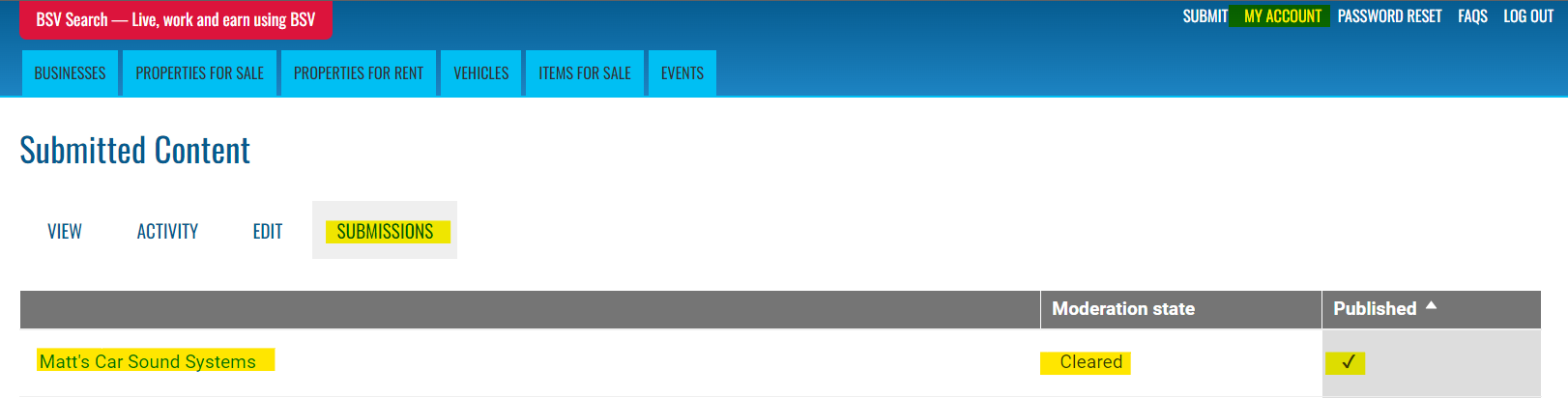
2) Go to My Account > Submissions, and look out for Cleared (meaning Cleared for Publication) and confirmed that the document is Published (a check mark).
Important Items to Understand
- BSV Search does not represent any of the Sellers or Buyers on the website
BSV Search provides a website where offers are made to sell or buy but it is important for website users and visitors to know the following:
- We do not verify, certify or claim to know any of the participants here. This is why we encourage people to visit the website provided about each post or have a conversation with the person making the offer to find out what you can before deciding to transact with them.
- We do not facilitate the transaction or payments between participants here. It is up to you to make arrangement with each of the individuals with whom you do business.
- Trust and Identity
People would likely be more comfortable dealing with people they know a little about. Make the most of the space provided for you to write as much information as possible to others considering doing business with you. It is up to you to decide how much information you wish to provide but if you have a website, an email address or a phone number , consider if you should share them to make it easier for other users to contact you.
- Items and activities not allowed
The concept is, if it is illegal for you to sell, or offer for rent or otherwise, then please do not post it on BSV Search. Obvious items include illegal drugs, weapons and all those things not considered savoury by most people, and by the law. If you are not sure, please check the laws that apply to you.
Transacting Online and with BSV Search
- Tips on transacting online and with BSV Search
BSV Search provides offers from people and businesses who submit them to this website. We do not certify or verify who they are. We are not involved in whatever transactions may take place between two people about the items posted here. We encourage people to take basic precautions when dealing with people they do not know, some of which are mentioned below:
- When you need to meet with people to exchange goods and transfer payments, meet with people in a public area or, if possible, near a police station.
- Before you buy from someone, check out their profile so you know the person making the offer before you decide to transact with them. The scrutiny you apply depends on what they are offering. You might care less if you are buying a box of old books than if you were buying a car or a motorcycle, where the government establishes a process on how such sales are to take place.
- Transacting in BSV is no different from agreeing to exchange one thing for another (unless under dictatorships and authoritarian regimes explicitly prohibiting the use of Bitcoin and cryptocurrencies). You can write contracts and agreements.
- Therefore, when practical - like in cases of sales of expensive items - write an agreement. This agreement should provide details of both parties, including their names and addresses, to evidence that a transaction is taking place. Emails and communications of this are useful in proving details of the intentions of the people transacting.
- Having a contract/agreement evidenced by signatures, and third parties, including notaries when appropriate, are helpful if one party needs to assert their rights because the other person did not fulfil their side of the bargain.
Asking Questions about a Post and Providing Feedback or Reviews to a Business or a User
- How do I ask a question about a post?
If you have questions about a post, you can ask it privately (if you do not want your question and your conversation to be seen by others) or publicly (if you are happy for your question and conversation to be seen by other users of the website).
Option 1: Privately
Within the description of a post, look for the Contact tab and the username of the author of the post.
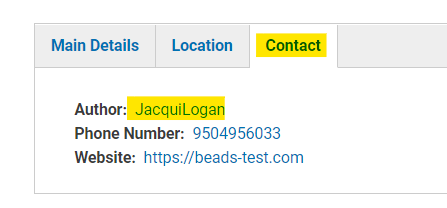
Click the name which leads you to the author's user profile:

Click on Contact, fill out the Contact Form and send.

The message is sent to the author's email address so they can email you back.
Option 2: Publicly
This is useful if you think that other users interested in the product might also benefit from knowing the answer to your question and you do not mind sharing the conversation for the rest to see on the website.
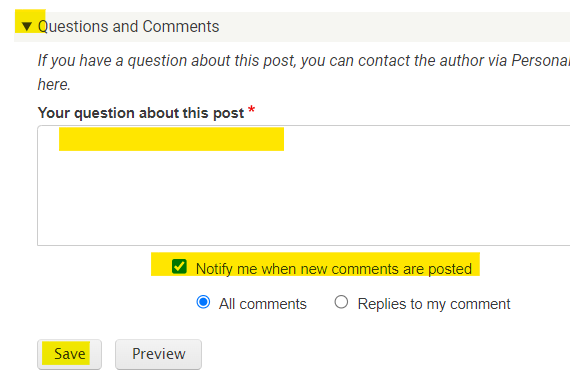
To ask your question publicly, expand the Questions and Comments at the bottom of the submission/post. Type your question, choose whether you want to be notified when there's a reply to your comment or any comment made on the same post.
- How do I provide a Feedback to, or Review of, a Business?
At the bottom of a Business Page, expand the Business Review section. Fill out the Subject or Title of your Review, give the Business a Rating out of 5 stars, where 5 is the most favourable and 1 is the least favourable.

Please note that other users and the business you are reviewing may also reply to your review to give them the chance to respond to reviews and feedback they receive.
- How do I provide a Feedback to, or Review of, a User?
At the bottom of a User Profile is a User Feedback/Review form that you can fill out.
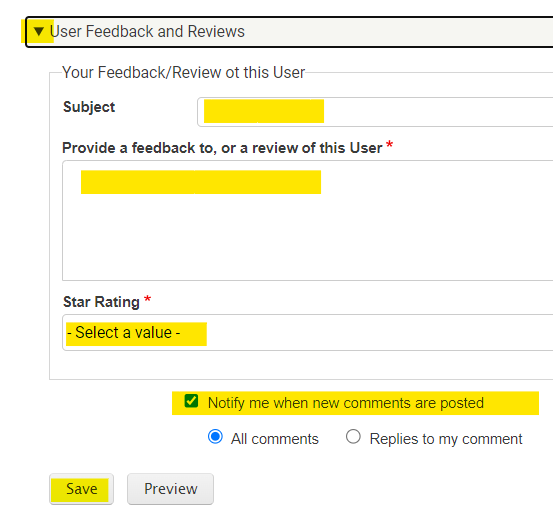
Please note that other users and the business you are reviewing may also reply to your review to give them the chance to respond to reviews and feedback they receive.
- 'Sample' and 'Live' Content
While we are waiting for more people like you to get involved and start using and adopting BSV in your daily lives, work and business, we post sample content for demonstration purposes. Eventually, live content will drown out the sample content after which we will slowly deactivate the sample content.
To find out whether a listing is a sample or a live content, you can check it under the POST DETAILS section.
When searching for something on the website, you can filter the search results to only show 'live content' by indicating your preference on the Search from under 'Content Class'.
BSV-TIPPED CONTENT
- Guidelines with BSV-Tipped Content
- Each content should have its own unique BSV address. Meaning, you should not assign a BSV address to other content.
- Only use content that you created, or that you have a legal right to use, to avoid copyright disputes in the future.
- Copyright Issues when using other people's songs or music and asking for tips
Performing a song in a public forum where you are not asking for tips could be considered a fair use of the song, and you would not need permission from the copyright holder. However, if you perform a famous song online, record it, and publish it online, and ask people to send you tips, you may be infringing on the copyright of the song's owner, which could result in damages, attorney's fees, and even criminal charges.
Here are some specific reasons why your actions could be considered copyright infringement:
- You are creating a derivative work of the song. When you record a cover of a song, you are creating a derivative work of the original song. This is a copyright-protected work, and you need permission from the copyright holder to create a derivative work.
- You are distributing the song without permission. When you post your recording of the song on YouTube, you are distributing the song to a large audience. This is a copyright-protected act, and you need permission from the copyright holder to distribute the song.
- You are asking for tips in exchange for the song. Even if you are not charging for the song directly, you are asking for tips in exchange for it. This could be considered a form of payment, and you may need permission from the copyright holder to accept payment for the song.
To avoid copyright infringement, you could:
- Obtain a license from the copyright holder. This would give you the legal right to perform, record, and distribute the song.
- Create your own original work. This would avoid the need to obtain permission from the copyright holder.
It would be advisable to consult with an attorney to get legal advice on how to use copyrighted material, such as songs.
Ordinals
Ordinals let you register your own on-chain creations — images, music, video, interactive pages and more — into a browsable directory where others can view them, tip you, or buy and license them in BSV. This section explains how it works.
- What is an Ordinal?
An Ordinal (a "1Sat Ordinal") is a piece of content — an image, an audio file, a video, a web page, text, or another file — that has been permanently inscribed onto the BSV blockchain. Because it lives on-chain, it can never be altered or deleted, and it carries its own provenance: who created it and when. The catch is that nobody can easily browse Ordinals unless a website surfaces them — which is exactly what the Ordinals directory on BSV Search does.
- What is the Ordinals directory on BSV Search?
It is a place where you can register your own Ordinals so other people can discover them, enjoy them, and support you. Each registered Ordinal gets its own page that shows the content itself, its on-chain details (creator, size, collection), and any ways the creator has chosen to be supported — tips, purchase, or licensing. You can browse everything in the directory and filter by media type, collection, categories and tags.
- How do I register my own Ordinal?
You register an Ordinal by its transaction ID (TXID) — the on-chain address of the inscription. Start a new Ordinal submission, paste in the TXID, and BSV Search automatically fetches the content, detects what type of media it is, and shows you a live preview so you can confirm it is the right one before you submit. You then add a title, choose categories and tags, and submit it for review like any other content on the site.
- What is a TXID and where do I find it?
A TXID (transaction ID) is the 64-character code that identifies the transaction in which your content was inscribed on-chain. It can optionally be followed by an output index, for example _0. You will find it in the wallet or service you used to inscribe your Ordinal (for example, your inscription receipt or transaction history). Paste it in exactly as it appears — BSV Search will tidy up the formatting for you.
- What types of media can I register?
Images, audio, video, interactive (HTML) pages, plain text, and other file types are all supported. You do not need to tell us the type — BSV Search detects it automatically from the inscription and renders it the right way (an image is shown as a picture, audio and video get players, an interactive page is shown safely, and so on).
- Do you store my Ordinal's file? Where does the content come from?
No — the whole point of an Ordinal is that it lives on the blockchain, not on our servers. BSV Search stores only the TXID and a little information about it, then fetches the content from the chain on demand whenever someone views it. Your content stays on-chain and under your control; we simply make it browsable. In the future, we may 'cache' the files on our servers to help reduce the load on Indexers, when that ever becomes a problem, so they do not have to serve the files every request. If we have it 'cached' then it is one less request.
- How do tips, purchases and licensing work?
These are display-only — BSV Search shows the relevant BSV address (with a QR code) so a supporter can pay you directly, peer-to-peer. There is no middleman, escrow, or fee taken by BSV Search. Amounts and prices are shown in BSV only. "Tips" are a no-strings thank-you; "Purchase" is for personal use; and "Licensing" is for commercial use. Each shows only when the creator has inscribed a BSV Tipping Address on the metadata of their Ordinal upon inscription.
There are many places where you can inscribe ordinals. The one we use is 3DOrdi.io. You create a 'Collection', and then add a 'Trait' with a label that has the words Tip/Tipping/Tips, Buy/Purchas/Licens, maybe the word 'Address' or 'BSV' then followed by a valid BSV Address. If we are able to detect these Addresses, then we will use them here for that purpose.
We do not use the Inscriber's BSV Address that paid for the inscribing because the funds they have there could be for many reasons, not a specific reason like tipping, licensing or buying. We also do not tip BSV address on which the ordinal is burnt to avoid risking destroying those ordinals.- Why can't I type in my own tip, buy or licensing address?
To protect creators. Because anyone could register someone else's Ordinal by its public TXID, allowing free-typed payment addresses would let a stranger redirect your tips and sales to themselves. So BSV Search only ever uses payment addresses that are inscribed in the Ordinal itself, on-chain. If an Ordinal has no inscribed payment address for an offering, that offering simply isn't shown — money can only ever reach an address the creator committed to on-chain.
- What do the "tips" figures on the cards mean?
For Ordinals that have a dedicated tip address inscribed on-chain, BSV Search adds up the total amount tipped to that address and the number of tips, and shows it as a simple appreciation signal (for example, "♥ 0.0003 BSV · 3 tips"). These figures are refreshed roughly once a week, so they may lag the very latest activity by a few days.
- What is a "Terms of Use" record, and why would I use one?
When you let people purchase or license your work, they need to know the terms. Rather than retyping your terms on every listing, you create a reusable Terms record — a short entry with a label (e.g. "Music Terms") that points to the on-chain document holding your current terms of use. You then attach that record to your Ordinal's purchase or licensing offering. The big advantage: if you ever update your terms, you change the record once and every Ordinal that points to it updates automatically.
- How do I create and manage my Terms records?
You manage your own Terms records from the "My Terms records" page (also linked as a "+ Add new Terms record" option right on the Ordinal submission form). Give the record a label and paste the TXID of the on-chain document that holds your terms — you'll see a live preview of that document so you can confirm it's correct. Each person manages their own records, just like categories.
- Why isn't my Purchase or Licensing offering showing on my listing?
Two things are needed for a Purchase or Licensing offering to appear: an inscribed payment address for it (see the question about typing your own address), and a Terms record attached to it. Purchase and Licensing are only shown when a Terms record is attached — this makes sure buyers and licensees always have terms to read. Tips are different: they show whenever a tip address exists, and a Terms record is optional.
- Can I set default terms so I don't have to choose them every time?
Yes. On your account profile you can set a Default Terms record. When you register a new Ordinal, its tip, purchase and licensing terms are pre-filled with your default, so a single document that covers everything needs no extra step. You can always override or clear it on any individual Ordinal.
- How do my buyers know which terms applied when they bought?
Every listing shows a "View terms" link that opens your current terms document. Because both the payment and the terms live on-chain with dates, the version of your terms that was in effect at the time of a payment is always provable — updating your current terms later never changes agreements that were already made.
- Do Ordinal submissions need to be approved?
Yes — Ordinals go through the same review process as other submissions on BSV Search (new → Admin to Review → Cleared → Published). You can register your Ordinal, see a preview, and submit it; it becomes publicly visible once it has been reviewed. See the "Making a Submission" section above for how the moderation states work.
- Can I register an Ordinal I didn't create?
Please only register content you created or have a legal right to use, and the same copyright care described in the "BSV-Tipped Content" section applies here. Remember that payment addresses come only from what is inscribed on-chain, so funds always go to the parties committed in the inscription — but you should still not list work that isn't yours to offer.
- Can I edit or remove my Ordinal listing later?
Yes. You can edit your Ordinal's title, categories, tags and attached Terms records at any time from your listing, and you can unpublish or delete it. The on-chain content itself is permanent and stays on the blockchain regardless — editing the listing only changes how it appears in the BSV Search directory.
Web3 Sites
Web3 Sites are complete websites whose pages have each been permanently inscribed onto the BSV blockchain, and which BSV Search displays under a short address such as bsvsearch.com/earthlog.web3. This section explains what they are and how they work.
- What is a Web3 Site?
A Web3 Site is a complete website whose individual pages have each been permanently inscribed onto the BSV blockchain as Ordinals. Instead of living on a web server, every page is stored on-chain — so it is timestamped, carries its own provenance, and cannot be quietly altered or taken down. BSV Search caches these files, and services them to site users here on BSVSearch.com.
- What is the Web3 Sites directory on BSV Search?
It is a browsable index of the Web3 Sites we have published, at bsvsearch.com/web3sites. You can search by keyword and filter by category or tag, then open any site and read it right here on BSV Search — no wallet, plug-in or special browser required. It is the counterpart to the Ordinals directory, but for whole websites rather than single inscriptions.
- How is a Web3 Site different from an ordinary website?
An ordinary website lives on rented hosting under a DNS domain; if the bill goes unpaid or the host shuts down, the site vanishes — a great deal of the early web has been lost this way. A Web3 Site's pages live on the blockchain instead, so they persist independently of any single company. BSV Search simply reads those on-chain pages and presents them to you as a website.
- How do I visit a Web3 Site?
Open the Web3 Sites directory, choose a site, and it opens on BSV Search at its short address — for example, bsvsearch.com/earthlog.web3. From there you can click through its pages just like any other website. Each page you see came from its inscription on the blockchain.
- Where are the pages stored — does BSV Search host them?
The pages, along with their images, audio and other files, are stored on the BSV blockchain, not on our servers. BSV Search fetches that on-chain content, caches it so it loads quickly, and serves it to you. We are the window onto the content, not its permanent home — the blockchain is.
- Can a Web3 Site be changed or taken down once it's published?
The inscribed pages themselves are permanent and cannot be edited or deleted — that is the whole point. What the author can do is publish a new version of a page and point the site's address at the new inscription. The earlier version still exists on-chain; the site simply displays the latest one.
- How does an author update a page?
They re-inscribe the page as a new Ordinal and re-point that page's address to the new inscription. Links between the pages keep working, so a single page can be refreshed without rebuilding the whole site. Nothing is overwritten — the previous inscription remains on the chain as a permanent record.
- Can I get my own Web3 Site? What do I need to publish a Web3 Site?
Each page of your site is first inscribed on-chain as an Ordinal, which gives it a transaction ID (TXID). A Web3 Site is then simply a name plus a small map that links each page to its TXID. The pages themselves are ordinary, self-contained HTML files, so building one takes the same skills as building any simple website — the only difference is that the pages live on the blockchain rather than on a server.
We've also made a video that walks through the whole process: "Web3 Websites for Photographers, Artists and Musicians: Prove Authorship, License Your Work, Get Paid" (https://youtu.be/BSecAAF4QlI).
At the moment, Web3 sites on the BSV blockchain are viewed through https://browser.ordnet.io/. (Web3 domains can be bought at https://domains.ordnet.io/). Soon, you'll also be able to register your site here on BSV Search so people can browse it directly — the way we already display the Earth Log, Marquez and Thank You sites. Making these sites viewable in more than one place adds real resilience: your site, and everyone else's, stays findable and browsable even if any single browser goes away. We're working on this now, so it's worth checking back.
- Can visitors support or tip a Web3 Site?
Not yet, but it's on the way. We plan to support tipping for Web3 sites the same way we already do for Ordinals. Once it's live, BSV Search will read your site's home page (index.html) inscription and look for a field specifically marked as a tipping address — for example, one labelled "BSV Tipping Address". If it finds one, a tip option will appear so visitors can send the author a tip directly; if a site doesn't show one, the author simply hasn't set it.
- How is a Web3 Site related to Ordinals?
They are built from the same foundation. Every page of a Web3 Site is an Ordinal — an on-chain inscription — so a Web3 Site is really a collection of Ordinals (the pages, plus their images, audio and other files) tied together under one name and presented as a browsable website. If you understand the Ordinals directory, Web3 Sites are the next step up: whole sites rather than single pieces. Web3 Sites provide you an opportunity to present your individual ordinals in a way that you want them presented.
- What happens to my Web3 Site if BSV Search disappears?
Because every page lives on the BSV blockchain, the content itself does not depend on BSV Search to survive — the inscriptions remain on-chain permanently. BSV Search provides a convenient way to browse and read them, but the underlying pages would still exist and could be served by any tool that can read the chain.