
Introducing Sovereignty Tools: Portable BSV Tools for Your Keys and Payments
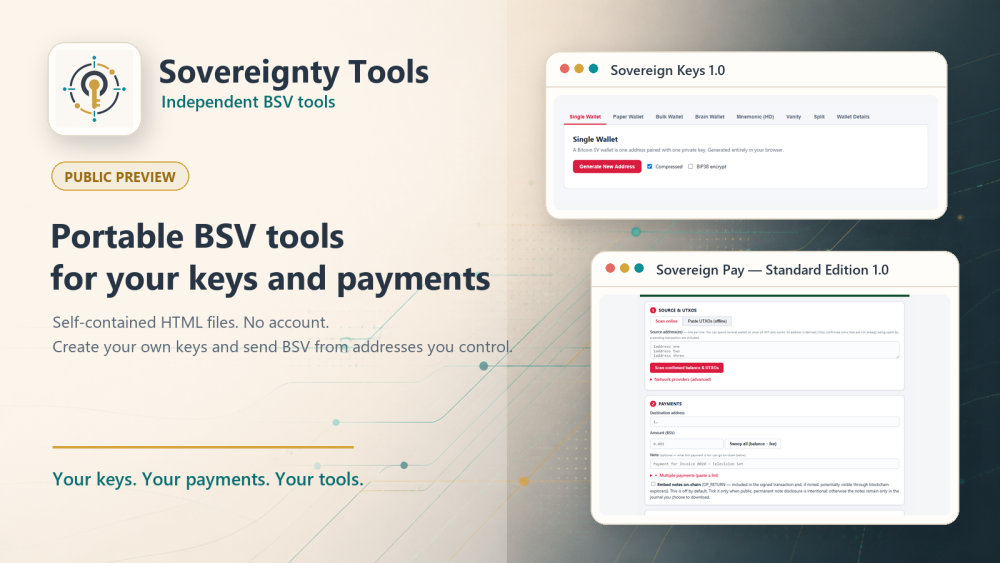
After years of using different Bitcoin SV tools and wallets, I kept building a mental list of features and capabilities I wanted.
I learned from independent tools and wallets including Bitaddress.org, Bitsweep.org, ElectrumSV, RockWallet, Centbee and HandCash. Each demonstrated useful ways to create keys, manage funds or make payments. Together, they helped shape my thinking about what another kind of BSV tool could look like.
Ideally, I wanted tools that depended as much as practical on the BSV network and its stable protocol—not on one website or business remaining available forever.
Businesses can change direction, lose funding or stop operating. Websites can disappear. Software may no longer be maintained.
I wanted tools that could remain useful outside a single service:
- Self-contained in individual HTML files.
- Easy to save, transport and back up.
- No software installation.
- Quick to open in a modern web browser.
- No account or sign-up.
- No custody taken by the tool.
- No application-side user profile or transaction database.
- Compatible with BSV addresses and WIF private keys controlled by the user.
- Local key creation, transaction preparation and signing.
- Network services used only when the user deliberately asks to find spendable coins or send a signed transaction.
- Source-visible, so the HTML and embedded code can be inspected.
Those ideas led to Sovereignty Tools.
Two tools are now available
The first Public Preview contains two tools: Sovereign Keys and Sovereign Pay.
Sovereign Keys 1.0
Inspired by Bitaddress.org, Sovereign Keys helps you create BSV keys and printable paper wallets on a machine you control.
It is a self-contained HTML application designed to make no network or browser-storage calls. You can download it, move it to an offline device and use it without installing software or creating an account.
It can create a single key, or hundreds of keys at a time, create a set of related addresses from one recovery phrase, divide a secret into separate parts, and search for an address that begins with characters you choose.
Use Sovereign Keys when you want to create and control your own BSV keys.
Sovereign Pay
Sovereign Pay helps you use compatible BSV addresses and WIF private keys you control to construct, review, sign and send payments. A WIF is a text-form private key that authorizes spending, so it must be kept secret.
It lets you:
- Make a Payment
- Create a Pay Page
The transaction is prepared and signed locally. When you ask it to, Sovereign Pay can use independent BSV network services to find confirmed spendable coins or send the already-signed transaction to the network.
Use Sovereign Pay when you want to send BSV without moving your funds into a new custodial account or being forced to use addresses supplied by the tool.
Choose what you want to do
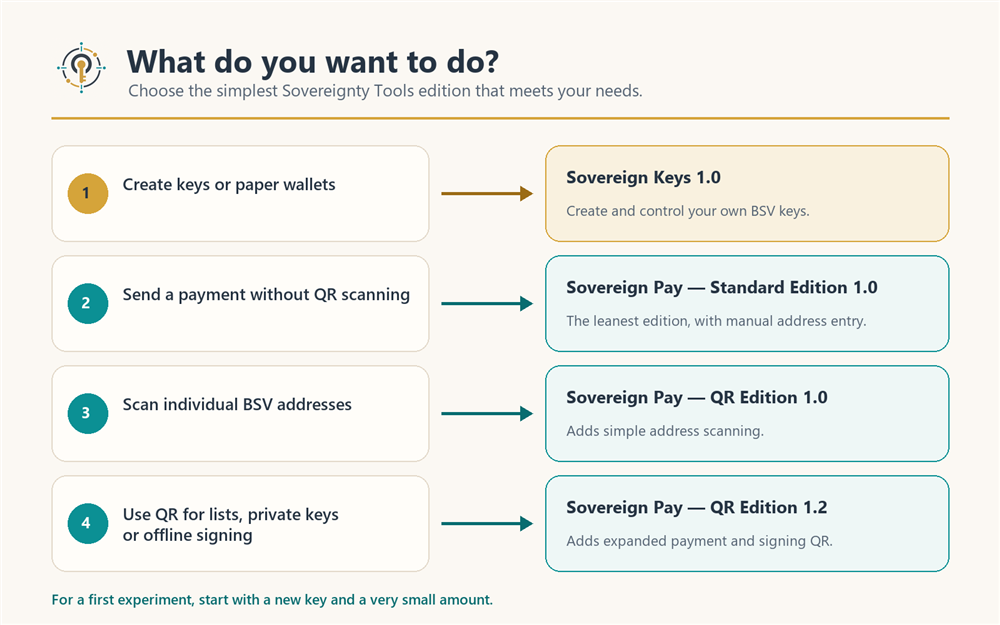
There are three Sovereign Pay editions. Use the simplest one that meets your needs.
I want the simplest payment tool
Choose Sovereign Pay — Standard Edition 1.0.
This is the leanest edition, with deliberate manual address entry.
I want to scan individual BSV addresses
Choose Sovereign Pay — QR Edition 1.0: Simple address scanning.
This edition adds QR scanning for individual address fields without adding the more advanced QR options.
I need expanded payment or signing QR
Choose Sovereign Pay — QR Edition 1.2: Expanded payment and signing QR.
This edition adds QR support for lists, payment requests, private keys, signing on an offline device, and returning signed transactions to a connected device.
In short:
Choose Edition 1.0 when you only want to scan addresses. Choose Edition 1.2 when you also need QR support for lists, private keys, offline signing or signed transactions.
The quickest way to try Sovereign Pay
For a simple first experiment, use a new source address containing only a tiny amount of BSV.
Open Standard Edition and:
- Enter the public BSV address containing the funds and find its confirmed spendable coins.
- Enter the destination address and amount.
- Send the remaining change to a fresh address you control and have backed up.
- On a device you trust, enter the source WIF, review the transaction, and select Build & sign transaction.
- Clear the WIF field after signing. If you copied and pasted the WIF, also clear it from your device's clipboard and clipboard history. Then review the result and select Send transaction to BSV network.
- Use the displayed transaction ID to check its status.
Sovereign Pay uses the WIF locally to create the transaction signatures. The released application does not send the WIF in its network requests, save it in browser storage, place it in the payment journal or include it in the signed transaction.
The WIF remains in the form until you clear it or close the page, so use this quick connected method only on a device you trust.
After the transaction is confirmed, check that nothing remains at the old source address. If you intend to retire its private key, do not send funds to that address again.
Sovereign Pay also lets you sign on a separate offline device. The guides explain those additional steps for people who want that separation.
Portable and published on BSV
The applications can be saved as self-contained HTML files. Their code and required libraries are contained inside the applications rather than being loaded from an external content-delivery network.
The complete 16-file Sovereignty Tools collection—including the applications, guides and website pages—has been inscribed on the BSV blockchain, meaning it has been published as blockchain data. The inscriptions have been mined and reconciled with the approved release files.
Each inscribed file has a transaction ID, or TXID, identifying the BSV transaction containing it.
When should you check a file?
If you open the tools through the official Sovereignty Tools page on BSVSearch.com, you do not need to calculate a file hash just to explore them or begin a tiny experiment.
Checking the file becomes particularly important when somebody sends you an HTML copy by email, chat, USB drive, cloud storage or another website. A modified file can keep the same name and appearance.
A SHA-256 value is a digital fingerprint of a file. If the file changes, its SHA-256 value changes too.
Before entering a WIF or using funds with a file received from somewhere else, compare its SHA-256 with the value published on the official Sovereignty Tools release page. If the values do not match, do not treat that file as the official release.
If somebody sends you a link, check that it leads to the official Sovereignty Tools page on BSVSearch.com. If you are unsure, visit BSVSearch.com yourself and open Sovereignty Tools from there.
Public Preview
Sovereign Keys 1.0 and all three Sovereign Pay editions are available as a Public Preview.
We have carried out extensive internal testing and checks on the current releases, and we are happy with the results. We are now making the tools available so people can try them carefully on their own devices and share useful feedback.
Begin with a new key and a very small amount while becoming familiar with the tool.
Sovereign Pay starts with blockchain note embedding switched off. If you deliberately enable it, remember that the note may become public and permanent. Do not include private or confidential information.
Sovereign Pay usage fee
Sovereign Pay charges a tool fee of 0.01% of the transaction amount, with a minimum fee of 1 satoshi, the smallest unit of BSV.
This is also a practical demonstration of BSV micropayments: software can charge a very small usage fee within a Bitcoin transaction without requiring a subscription or conventional payment account.
Try Sovereignty Tools
Find the current tools, editions, guides and testing information on the official Sovereignty Tools page:
https://bsvsearch.com/sovereigntytools.web3
Useful starting points:
- Choose Your Tool and Work Safely
- Sovereignty Tools Testing Status
- Sovereign Keys 1.0
- Sovereign Pay — Standard Edition 1.0
- Compare the Sovereign Pay QR editions
Questions and constructive feedback are welcome in the Sovereignty Tools forum discussion.
Please include the edition and version, your device and browser, the steps you followed, what you expected and what happened.
Never post or send a WIF, private key, seed, mnemonic or wallet backup when asking for help.
Your keys. Your payments. Your tools.